© 2025 Juan Miguel Belarmino. All Rights Reserved.
{ "Quote" : "Automation doesn't steal our humanity, it multiplies it, turning hours of toil into moments of meaning"}



Lets Connect!



Project #1 - Apollo Leads Enrichment
CONTENTS

Project #2 - Asana Automation
Workflow Steps
Lead Intake & Processing
Trigger: Webhook receives new lead information.
Data Processing: Extracts company domain from email address.
Enrichment: Calls Apollo API to gather detailed company information using the domain.
Priority-Based Routing (3 Paths)
🔴 High Priority Path (Path A): Filters high-priority leads; saves to Google Sheets; sends immediate Slack notification; uses AI for personalized email draft; sends automated email.
🟡 Low Priority Path (Path B): Filters standard low-priority leads; saves to Google Sheets; sends basic email via Gmail.
⚪ Low Priority Null Path (Path C): Handles low-priority leads with missing data; saves to Google Sheets; sends basic email via Gmail.
Workflow Info
A sophisticated system that enriches incoming leads with company data and routes them based on priority levels.
Key Benefits
Automated lead enrichment with company intelligence.
Smart prioritization for immediate attention to high-value leads.
Multi-channel notifications (Slack for urgent, email for standard).
AI-driven personalized outreach for high-priority prospects.
Comprehensive tracking via Google Sheets.
Workflow Steps
Project Status Monitoring
Trigger: The workflow starts when an updated Asana task is detected in the workspace.
Status-Based Routing (5 Paths)
🔵 Path A: Ready to Start
Automatically creates a dedicated Google Drive folder for project organization.
Adds an Asana subtask to begin task breakdown and execution.
🟠 Path B: No Response
Sends a follow-up Gmail message to re-engage clients who haven't responded.
🟡 Path C: Quoted
Sends a Gmail notification confirming that the project quote was delivered.
🟢 Path D: Approved
Sends a Gmail confirmation when the client approves the project.
🟣 Path E: Paid & Closed
Sends a Gmail payment confirmation to the client.
Routes into 3 service-specific sub-paths for tailored Gmail notifications:
Service 1: Custom Gmail message
Service 2: Custom Gmail message
Service 3: Custom Gmail message
Key Benefits
All-in-One lifecycle automation that manages every stage from initial task update to project completion.
Built-in error handling ensures the workflow continues even if certain steps fail.
Automated email communication keeps clients updated at every milestone.
Google Drive integration for automatic project file organization.
Asana automation with subtask creation for structured task execution.
End-to-end project oversight, reducing manual work and ensuring smooth project progression.
Workflow Info
A complete project lifecycle automation system that monitors Asana task updates and triggers different actions depending on the project status.

Project #3 - Facebook Automation Blog Post V1
Workflow Info
A fully automated video-to-content pipeline that transforms MP4 videos into polished blog posts, generates custom images, and publishes everything directly to Facebook or any platform.
Key Benefits
Automated content multiplication → One video becomes multiple blog posts.
AI-powered visuals → Every post includes a unique custom DALL-E image.
Hands-free social posting → Automatically publishes to Facebook or any platform.
Highly scalable → Processes unlimited videos as soon as you upload them.
Fast turnaround → Converts raw video into share-ready content with zero manual work.
Workflow Steps
Video Capture & Processing
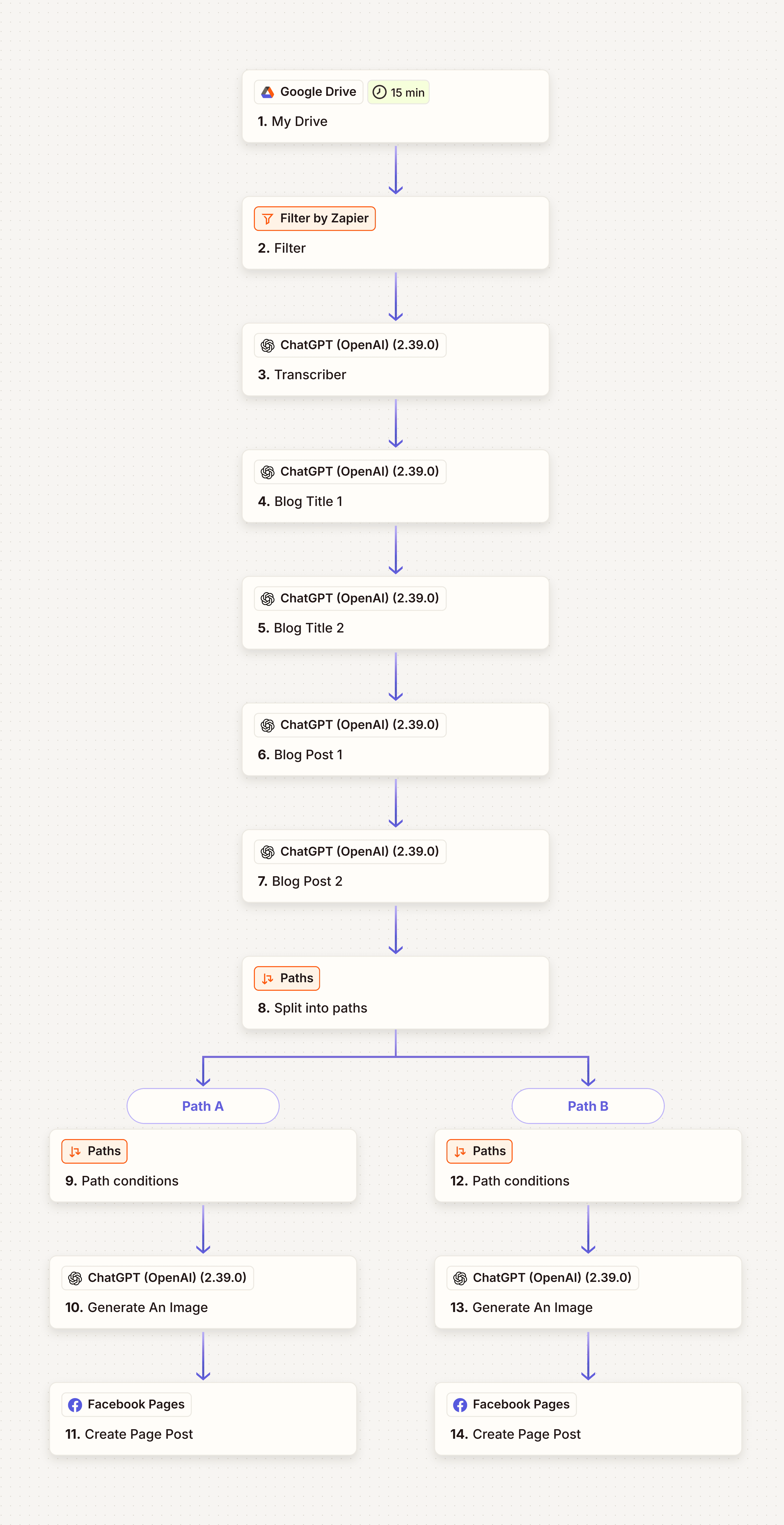
Trigger: The workflow begins when a new MP4 file is detected in Google Drive.
Automation Flow
📁 Google Drive Monitor
Detects new uploaded files and initiates processing.
🔍 Video Filter
Ensures only MP4 video files move forward in the workflow.
🎤 AI Transcription
Converts video audio into accurate text using automated transcription.
✍️ Blog Generation
Uses OpenAI GPT-4o-mini to create two unique blog posts from each transcription.
🔄 Content Loop
Loops through each generated blog post for processing and publishing.
🎨 AI Image Creation
Generates a custom DALL-E 3 image for each blog post based on the title or topic.
📱 Facebook Auto-Publishing
Uploads each blog post with its corresponding image to your selected Facebook page (“For Testing”).
Workflow Info
A fully automated content creation system that converts uploaded MP4 videos into multi-format social media content, complete with AI-generated blogs, titles, and images—then publishes everything across multiple platforms.
Workflow Steps
Video Detection & Intake
Trigger: The workflow activates when a new video is added to your Google Drive “Videos” folder.
📁 Content Discovery
Monitors Google Drive for new uploads.
Filters files to only process those containing “mp4” in the filename.
Content Generation Pipeline
🎤 AI Transcription
Extracts and transcribes audio from the video into clean text.
📝 Title Generation
Produces two unique blog titles from the transcript for multi-angle content.
✍️ Blog Writing
Creates two complete blog posts, each based on the generated titles.
Parallel Publishing (Path A & Path B)
For each blog post:
🎨 AI Image Generation
Produces a custom, AI-generated image for each blog using ChatGPT.
📱 Facebook Auto-Publish
Automatically posts the blog + generated image to your Facebook Pages.
Key Benefits
Fully automated workflow — upload one video, everything else happens behind the scenes.
Content variation — creates multiple blog versions for A/B testing and reach expansion.
Cross-platform distribution — transforms a single video into full social-ready content.
Parallel execution — processes and publishes across multiple channels simultaneously.
Project #4 - Facebook Automation Blog Post V2

Project #5 - Referral Enrichment Using Postman
Workflow Steps
Referral Intake & Processing
Trigger: Workflow starts when the webhook receives new referral data.
📥 Data Capture
Extracts the referral’s Name, Email, and Referral Code from the incoming request.
Data Logging
📊 Google Sheets Recording
Automatically logs each referral to the “Referral Post Information” spreadsheet.
Stores all referral details for tracking and reporting.
Branding & Image Handling
🖼️ Brand Avatar Lookup
Searches Google Drive for “Bot.png” to use as the referral bot’s profile image.
🔗 Image URL Formatting
Converts the Google Drive link into a direct-access image URL compatible with Slack.
Team Notification
💬 Slack Notification
Sends a structured message to #new-referral with all referral details.
Displays the bot avatar and uses “Referral Bot” as the sender name.
Workflow Info
A fully automated referral processing system that captures new referral submissions, logs them for tracking, and instantly notifies your team with a branded Slack alert.
Key Benefits
Automated referral capture — every submission is instantly documented.
Real-time team alerts for faster follow-ups and visibility.
Consistent branding using a custom bot avatar in Slack notifications.
End-to-end automation with zero manual intervention required.

Project #6 - Youtube Automation
Workflow Info
A fully automated YouTube content pipeline that transforms raw video files into professionally published YouTube videos—complete with AI-generated titles, descriptions, hashtags, and custom thumbnails.
Workflow Steps
Video Detection & Intake
📁 Google Drive Monitoring
Watches the “Misty Sage Meditation Channel” folder for new uploads.
Filters and processes only MP4 video files.
AI Content Processing
🎤 AI Transcription
Extracts audio from the video and converts it into clean, structured text.
🧠 Metadata Generation (GPT-4o mini)
Creates compelling video titles
Writes detailed descriptions
Generates relevant hashtags for discoverability
Applies special logic for videos related to Astral Projection
Visual Enhancement
🎨 Custom Thumbnail Creation
Uses DALL·E 3 to generate a unique thumbnail based on the AI-generated title and description.
Publishing & Alerts
▶️ YouTube Auto-Upload
Publishes the video with all generated metadata and custom thumbnail.
✔️ Upload Verification
Confirms the video was successfully uploaded before continuing.
📧 Email Notification
Sends a confirmation message to the creator once publishing is complete.
Key Benefits
Fully automated workflow — from file upload to live YouTube video.
AI-enhanced metadata for better SEO and viewer engagement.
Unique thumbnails generated for every video.
Robust error handling through verification steps.
Instant notifications so you’re always updated.

Project #7 - Youtube Shorts Automation
Workflow Info
A fully automated YouTube Shorts production system that generates meditation-themed videos daily—complete with AI-created scripts, visuals, audio, and publishing.
Key Benefits
Fully hands-free — the channel runs itself daily.
AI-powered creativity with fresh titles/descriptions every day.
High production quality using custom video + custom audio.
SEO optimized metadata for better reach.
Reliable tracking via email notifications.
Workflow Steps
Automated Daily Trigger
🕰️ Scheduled Start
Runs every day at 7:00 PM, including weekends.
Begins the full content creation and publishing cycle automatically.
AI Content Creation
🧠 Title & Description Generation
Uses ChatGPT to craft:
Engaging YouTube Shorts titles (≤ 60 characters)
Compelling descriptions (≤ 300 characters)
Focuses on meditation topics: focus, healing, stress relief, third eye, concentration, frequencies.
Video Production
🎥 Pollo.ai Video Generation
Creates a 50-second vertical meditation video with serene nature themes.
Visual mood: calming blues, purples, and golds.
Imagery includes gentle waves, floating clouds, swaying trees, and peaceful natural scenes.
Audio Design
🎵 Suno API Ambient Soundtrack
Produces 40–60 second instrumental meditation audio.
Includes healing frequencies and matches the tone of the generated title.
Soft, slow-tempo ambient music designed for relaxation.
Publishing & Notifications
📤 YouTube Auto-Upload
Uploads the final meditation short directly to your channel.
Sets visibility to Public and applies proper tags, categories, and meditation-based hashtags.
📧 Email Confirmation
Sends an update to Email with:
Video details
URL
Performance monitoring reminders
L
o
a
d
i
n
g
.
.
.